
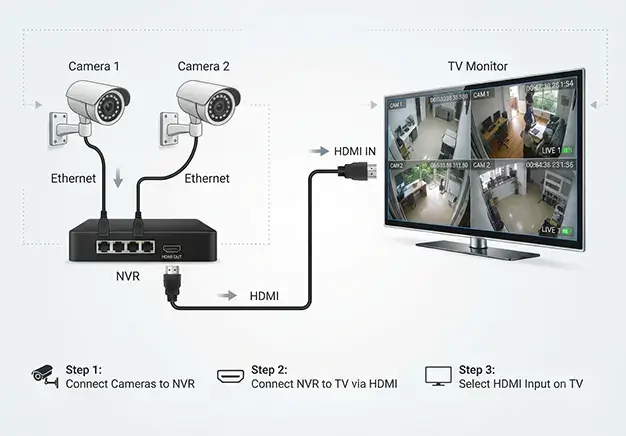
You can connect CCTV to a TV via a direct HDMI cable from the NVR, using a Smart TV casting app, or by integrating it into your home’s TV aerial system. This process allows you to view security cameras on a smart TV or watch CCTV on a television instantly. The chosen method determines the required cables, hardware, and signal quality.
Prerequisites for TV Viewing
You must complete several preparation steps before you link your security system to a television. Gathering the correct hardware saves time and ensures a stable video signal.
- You must check your TV input ports before purchasing any CCTV to TV cable.
- Ensure you have a standard HDMI 2.0 cable or a 4K HDMI cable ready.
- Verify the physical distance between your NVR and the television screen.
- Confirm your television supports the output resolution of your CCTV configuration.
- Connect both devices to the same local network for smart TV applications.
Method 1: The Direct NVR-to-TV Connection
The direct cable method offers the most reliable way to view the NVR on TV screens. This connection type delivers a zero-latency video feed without using internet bandwidth.
- Turn off both your television and your network video recorder (NVR) before connection.
- Plug one end of the cable into the HDMI OUT port on the NVR back panel.
- Plug the opposite end of the cable into the HDMI 1 port on your television.
- Turn on both electronic devices to start the video transmission process.
- Use the TV remote control to change the source input to HDMI 1.
- Select the VGA port if you choose to connect a legacy VGA CCTV to a TV setup.
- Adjust the NVR output resolution settings to match your specific television screen resolution.
Troubleshooting “Out of Range” Resolution Errors
An incorrect video output setting causes a CCTV black screen on TV displays. If your NVR outputs a 4K signal but your television only supports 1080p, the television screen will remain blank. This issue happens because the NVR resolution not supported TV error blocks the video stream feed. You must use a CCTV configuration on a laptop setup via a web browser to change the system settings. Lower the NVR output resolution to 1920×1080 inside the device menu. Save the changes on your laptop before you reconnect the NVR to the television screen.
Method 2: Viewing CCTV via Smart TV Apps & Voice Control
Modern smart televisions allow you to view surveillance feeds wirelessly without running physical video cables. You can install a dedicated smart TV CCTV app directly from your television’s application store. This software communicates with your network video recorder over your local household Wi-Fi network. The configuration process requires both your television and the recorder to share the exact same network router. Users can effortlessly view IP cameras on Android TV screens using native application dashboards. Many integration tools also support voice activation layout commands through Google Assistant or Amazon Alexa hardware tools.
Using Apple TV, Fire TV Stick, and Chromecast
Streaming media players provide a wireless pipeline to display security footage on your television. You can download surveillance apps like Hik-Connect or DMSS directly onto Fire OS or Android TV systems. This installation permits you to monitor CCTV on Fire TV Stick setups without running long hardware lines.
You can also view Hikvision on Apple TV devices by downloading compatible viewing utilities from the App Store. Another option is to cast CCTV to Chromecast dongles directly from your mobile phone or tablet dashboard. This transmission routes the video stream through your shared internet router to the screen.
Alexa & Google Assistant Voice Commands
You can connect your surveillance system to smart home networks for hands-free video monitoring. First, complete the Alexa CCT integration by linking your camera account in the Smart Home app. This link builds a secure relationship between your security cameras and your television hardware. Once connected, you can use a voice command to stream real-time video footage instantly. For example, say, “Google Home, show security camera” or “Alexa, show the driveway camera.” The assistant routes the video feed to your selected television display immediately.
Method 3: Connecting a Single Camera Directly
You can connect a camera directly to a TV without DVR hardware by using a specialised conversion tool. Older analogue cameras output raw video signals over coaxial cables that modern television ports cannot decode. To bridge this technical gap, you must install a BNC-to-HDMI TV converter box between the devices. This converter box intercepts the raw analogue signal, transforms the data packet, and outputs a digital signal. You plug the camera’s BNC cable into the input side of the converter box. Then run a standard HDMI cable from the converter’s output directly into your television.
The Ultimate Setup: CCTV over TV Aerials
An RF Modulator creates the ultimate professional installation by distributing your video feed to multiple rooms. This hardware device injects your security footage directly into the home’s existing TV aerial amplifier infrastructure. The modulator converts the digital NVR output signal into an RF frequency that mimics standard television broadcasts. This process turns your surveillance feed into a dedicated CCTV on a Freeview channel inside your home network. You can assign the camera feed to an unused station number like Channel 0. This method allows you to distribute CCTV to all TVs in the house using standard coaxial cables.
Professional CCTV & AV Integration in London
If you want seamless smart home integration or want your CCTV distributed to every TV in your property, our London-based CCTV and AV engineers can build the perfect system. We deliver bespoke CCTV AV integration services in London for both residential and commercial premises.
Our expert CCTV installation team manages cable routing, hardware calibration, and RF modulator distribution across your entire property. We eliminate configuration errors to provide a crisp, reliable, professional CCTV TV setup on every screen. Contact our office today to schedule a site survey with our technical engineers.