
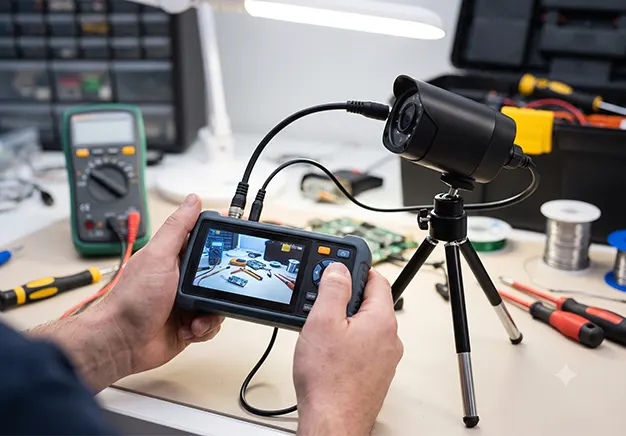
To check if a CCTV camera is working, you must verify its power supply, video signal, and network connectivity. CCTV camera testing happens in two distinct phases to isolate hardware issues. First, Bench Testing ensures the camera functions flawlessly before installation. Second, Fault Finding diagnoses and fixes issues in broken, already installed units.
Essential CCTV Testing Equipment
To diagnose video loss and power drops, technicians rely on specialised diagnostic hardware. These professional tools eliminate guesswork. They test signal integrity, check cable continuity, and measure power delivery directly at the camera site.
- CCTV Test Monitor: A portable handheld display that connects directly to the camera. It lets you view live video feeds, adjust lens focus, and configure local settings right at the installation point.
- Multi-functional CCTV Tester: An advanced, all-in-one diagnostic device. It supports both analogue coaxial and IP network cameras, handles ONVIF commands, traces cables, and can provide temporary PoE (Power over Ethernet) or 12V DC power to the unit.
- Digital Multimeter: A core tool used to check electrical properties. It measures voltage drops under load to see if a camera is starving for power, and tests cable continuity to find hidden breaks inside the copper wires.
Digital Multimeters & PoE Checkers
Power issues frequently disrupt CCTV technology. You must use a digital multimeter to test a 12V DC CCTV power supply on analogue systems. This tool measures the exact voltage at the camera end. For modern IP systems, you need a dedicated CCTV PoE tester instead. This device verifies that the network switch delivers enough wattage over the Ethernet cable.
CCTV Test Monitors
Technicians use compact handheld CCTV testers directly at the camera mounting location. These portable monitors often strap to the wrist. This strap keeps the installer’s hands free while working at the top of a ladder. The technician can view the live video feed immediately. This eliminates the need to climb down to check the main NVR display screen.
Phase 1: Bench Testing a New CCTV Camera
Never mount a security camera before bench testing it. Installing an untested camera creates massive inefficiency. If the unit is dead on arrival, you must dismantle the entire physical mount. Bench testing identifies hardware defects immediately at your desk.
- Unbox the Equipment: Remove the camera from the packaging. Inspect the casing and lens for shipping damage.
- Connect via Patch Cable: Plug the camera into your NVR using a short patch cable. This bypasses structural wiring to isolate the hardware.
- Verify IP Address: Open your NVR network settings. Confirm the camera assigns a local IP address or responds to its default static IP.
- Check Video Feed: Confirm the video stream displays clearly on your screen. Verify the frame rate and focus are stable before final deployment.
Phase 2: Troubleshooting an Installed CCTV Camera
Active system failures require systematic fault finding. If your monitor suddenly says “Video Loss,” you must trace the issue immediately. The breakdown typically stems from broken power lines, severed cables, or failed hardware ports. Follow a precise step-by-step diagnostic process. This process quickly isolates and replaces the broken link in the surveillance chain.
Testing CCTV Cables
Physical cables are crucial CCTV components that frequently fail. To test a Cat6 network cable, plug an RJ45 cable tester into both ends. The tool flashes LEDs in sequence to reveal broken copper pairs or crossed wires. For legacy analogue systems, use a dedicated BNC continuity tester. This device instantly detects short circuits or loose crimps inside the coaxial connectors.
Testing IP Camera Network Connectivity
Network drops isolate digital hardware. To check connectivity, connect your laptop to the same network switch as the IP camera. Open the Command Prompt terminal interface. Type the command ping followed by the camera’s specific IP address. The screen will display live transmission replies. Successful packet replies prove the camera is powered on and communicating over the local network.
How to Test Specific CCTV Hardware Functions
After verifying power and network links, you must test internal camera features. Observers often forget that optical, mechanical, and electronic systems function independently. A camera might stream video but fail to capture clear footage at night. Testing these specialised internal components ensures total operational reliability.
Testing Night Vision
Infrared sensors are critical for a best quality CCTV system. To test night vision, cup your hands tightly over the camera lens. This physical block simulates total darkness. Listen closely for an audible click. That sound is the internal IR cut filter moving. Next, look closely through your fingers. You should see the physical IR LEDs glow a faint red color.
Testing PTZ (Pan-Tilt-Zoom) Telemetry
Mechanical movement sets PTZ models apart from static CCTV types. To test motor functions, access the PTZ control panel on your NVR or test monitor. Send directional commands to pan, tilt, and zoom the lens. If the camera stays stationary, check the telemetry path. Analog systems require correct RS485 wiring and address settings. IP systems rely on clean network commands passing through the ethernet cable.
Professional CCTV Fault Finding & Repair in London
If your multimeter shows a cable break in the wall, or your enterprise IP system is offline, call our London engineers. Advanced CCTV network issues and hidden structural wiring faults require commercial diagnostic gear. Our local technicians carry specialized testers to locate and mend faults fast. Do not leave your premises unprotected. Contact our professional CCTV London repair team today to restore your CCTV security system to full operation.