
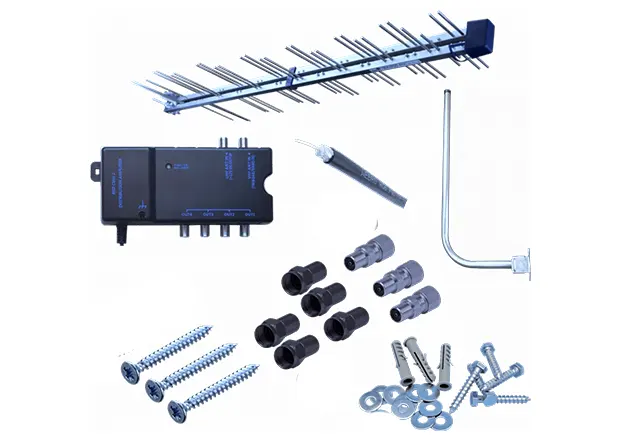
TV aerial accessories are supporting components that maintain stable signal transmission between the aerial and the television. They do not generate signals. They support and protect signal flow. These TV antenna accessories ensure the signal received at the roof level reaches your screen without interference or loss.
Signal performance depends on more than the aerial alone. A high-gain aerial cannot compensate for poor aerial components such as low-grade cables or loose connectors. Every connection point, cable run, and signal split affects overall reception quality.
TV aerial accessories include passive and active components. Passive accessories, such as splitters and connectors, guide or divide signals without power. Active accessories, such as boosters and amplifiers, strengthen weak signals when required.
This page explains each essential accessory and when it is needed. You will understand how the correct components protect signal strength and improve viewing reliability.
TV Aerial Connectors & Joiners
TV aerial connectors and joiners secure the connection between the coaxial cable and your television, wall outlet, splitter, or amplifier. They also allow two cable lengths to join together when extending a run. These TV aerial connectors maintain a continuous signal path and prevent signal leakage at connection points.
Common types include IEC connectors, F-type connectors, and coaxial couplers. IEC connectors are widely used for direct TV connections in UK homes. F-type connectors provide a tighter threaded fit and are common with amplifiers and satellite-compatible systems. Coaxial couplers act as aerial joiners, linking two coaxial cables without altering signal direction.
Loose or poor-quality coaxial connectors cause signal loss. Even a small gap creates resistance and allows signal escape. This results in pixelation, intermittent sound, or a complete signal drop. Corrosion inside connectors also reduces conductivity and weakens performance over time.
Shielding is essential in all aerial components. Properly shielded connectors protect the signal from electromagnetic interference caused by nearby electrical wiring, Wi-Fi routers, or household appliances. Double-screened or fully screened connectors reduce noise entry and preserve signal integrity. If shielding is inadequate, interference increases and picture stability declines.
TV Aerial Plugs & Wall Plates
A TV aerial plug connects the coaxial cable directly to the television or wall outlet. It creates a firm termination point that allows stable signal transfer from the cable core to the device. A correctly fitted TV aerial plug prevents signal leakage and maintains consistent conductivity between the inner conductor and shielding layer.
An aerial wall plate provides a fixed and clean connection point inside the property. It acts as a permanent TV aerial socket where the incoming cable connects behind the wall, and the television connects at the front. This setup protects cabling, improves appearance, and reduces strain on exposed wires. A coaxial wall outlet also simplifies future maintenance or equipment changes.
Wall plates are available as flush-mounted or surface-mounted options. A flush wall plate sits inside the wall cavity and provides a neat TV outlet faceplate finish. A surface-mounted socket installs directly onto the wall surface when internal routing is not practical. The choice depends on the wall structure and installation method.
Proper cable termination at the wall plate reduces interference and signal drop. If the cable shielding is not secured correctly, external electrical noise can enter the system. Tight, fully screened connections inside the aerial wall plate preserve signal strength and maintain reception stability across connected devices.
TV Aerial Splitters
A TV aerial splitter divides a single incoming signal into multiple outputs for more than one television. It allows one aerial to supply two or more rooms without installing separate aerials. A 2-way aerial splitter creates two signal paths from one input. A 4-way splitter creates four outputs from the same source. The number of outputs depends on how many televisions require connection.
Splitters operate as passive or powered systems. A passive TV aerial splitter does not require electricity. It simply divides the existing signal strength between outputs. A powered distribution system uses an amplifier to maintain signal levels across all connected points. This type is suitable when cable runs are long or when multiple televisions are connected.
Signal loss occurs every time the signal is divided. Measured in decibels (dB), a typical 2-way aerial splitter reduces signal strength by around 3–4 dB per output. A 4-way splitter may reduce signal strength by 7–8 dB per output. If the incoming signal is already weak, excessive splitting causes pixelation or signal drop. Proper system design ensures signal levels remain within acceptable reception thresholds.
TV Signal Boosters & Amplifiers
A TV aerial booster or signal amplifier increases signal strength when reception is weak. Amplification becomes necessary in low-signal areas or where long cable runs reduce signal levels. Cable resistance lowers strength over distance. A weak TV signal solution restores usable signal levels before they drop below the reception threshold.
Indoor boosters connect near the television and increase signal gain inside the property. A masthead amplifier is installed close to the aerial on the mast and strengthens the signal before cable loss occurs. A distribution amplifier powers multiple outputs while maintaining stable levels across several rooms. Each powered booster type serves a different installation layout.
Over-amplification creates signal distortion. Excessive gain overloads the tuner and introduces noise. A low noise amplifier improves signal clarity without adding interference. Correct gain selection ensures stability without causing over-amplification or signal breakup.
TV Aerial Cables & Extension Kits
TV aerial cables carry the signal from the aerial to the television. Cable quality is crucial for preserving signal strength. Poor-quality coaxial cables allow interference and reduce reception clarity, even with a strong aerial. Double-shielded coaxial cables, such as RG6, provide better protection against electromagnetic noise and maintain stable signal transfer.
Cable length affects signal attenuation. Longer runs naturally weaken the signal, causing pixelation or audio dropouts. Choosing a low-loss cable reduces these effects, especially in large properties or multi-room setups.
Aerial extension kits allow additional televisions to connect without installing a new aerial. They include cables, connectors, and wall plates to safely extend the signal while preserving strength. Proper installation ensures consistent reception across every connected device.
TV Aerial Junction Boxes
A TV aerial junction box connects multiple coaxial cables at a single point, creating a central hub for signal distribution. It organises cable runs and simplifies troubleshooting when multiple televisions or rooms are connected to a single aerial.
Internal junction boxes sit inside the property and protect connections from accidental damage. External aerial junction boxes are weatherproof and designed for outdoor use, shielding cables from rain, moisture, and corrosion. Both types maintain signal integrity by keeping connections secure and clean.
In structured TV distribution systems, junction boxes centralise the network. They allow splitters, amplifiers, and cables to join efficiently, reducing clutter and ensuring consistent signal levels throughout the property. Proper installation prevents interference and prolongs the life of all connected aerial components.
Aerial Brackets, Poles & Mounting Hardware
A TV aerial bracket or mounting pole secures the aerial in a fixed and safe position. Proper mounting hardware prevents movement caused by wind or vibration, ensuring stable signal reception and protecting the aerial from damage.
Common options include chimney brackets, wall brackets, and free-standing poles. Chimney brackets attach to the chimney stack, wall brackets fix directly to exterior walls, and poles allow flexible aerial positioning. Each type must account for wind resistance and structural stability to avoid loosening or collapse.
Corrosion-resistant materials, such as galvanised steel or powder-coated aluminium, extend the lifespan of aerial hardware. Safety is paramount for elevated installations. Correctly fitted brackets and poles reduce the risk of accidents during installation or maintenance while keeping the aerial stable through all weather conditions.
Signal Testing & Alignment Tools
Signal testing ensures the aerial receives and transmits a strong, reliable signal before and after installation. Without testing, issues such as weak reception, interference, or signal drop may go unnoticed until viewing problems occur.
Basic tools include TV aerial signal meters, aerial alignment tools, and signal finder apps. These allow installers to adjust aerial direction, check cable connections, and confirm signal strength on-site. Professional equipment, such as spectrum analysers, provides detailed analysis of signal quality, interference, and frequency levels.
It is important to understand the difference between signal strength and signal quality. Strength measures how powerful the received signal is, while quality indicates how clear and error-free the transmission is. Both factors must meet thresholds to ensure consistent television reception.
Common Problems Caused by Poor Accessories
Poor-quality TV aerial accessories can cause a range of reception issues. Typical symptoms include a pixelated TV signal, no signal on certain channels, weak signal strength, or missing channels altogether. These problems often appear suddenly or worsen over time.
Cheap cables or loose connectors create resistance and allow signal leakage, resulting in intermittent reception. Water ingress and corrosion in connectors or junction boxes further degrade performance, especially in external installations. Inadequate shielding exposes the signal to interference from nearby electrical devices or Wi-Fi networks, reducing clarity and stability.
Understanding these issues helps in troubleshooting. Identifying whether the problem stems from aerial components, cabling, or interference ensures the correct accessory is replaced or upgraded, restoring reliable television reception.
Choosing the Right TV Aerial Accessories
Selecting the best TV aerial accessories depends on several factors. Signal strength in your area determines whether a booster or masthead amplifier is necessary. The number of TVs connected affects whether you need a 2-way or 4-way aerial splitter. Cable length influences whether low-loss coaxial cables or extension kits are required, while indoor or outdoor setups determine the type of wall plates, plugs, and weatherproof junction boxes to use.
Compatibility between aerial parts is essential. Connectors, cables, splitters, and amplifiers must match in type and quality to prevent signal loss or interference. Using compatible aerial accessories ensures correct signal setup, reliable multi-room distribution, and stable television reception across all connected devices. Proper planning avoids over-amplification, weak signal zones, and unnecessary component replacement.
Professional Installation Considerations
Professional TV aerial installation is recommended for complex setups, commercial buildings, or multi-room signal distribution systems. Expertise ensures cables, splitters, and amplifiers are positioned and connected correctly, preventing signal loss and interference.
Installers manage signal balancing and set amplification levels to match the number of outputs and cable lengths. Correct calibration avoids over-amplification or weak signal zones, ensuring consistent reception throughout the property.
Safety and compliance standards are critical when mounting aerials at height or working on external walls. Certified aerial fitting services follow UK regulations, use corrosion-resistant hardware, and implement structured cabling to protect connections. Professional installation maximises long-term reliability, reducing maintenance and ensuring stable television reception for years.
Frequently Asked Questions
Do I need a TV aerial splitter for multiple TVs?
Yes. A TV aerial splitter lets a single aerial feed multiple TVs. It divides the signal while maintaining reception quality.
What is the difference between a TV aerial splitter and an amplifier?
A TV aerial splitter divides one signal into multiple outputs for several TVs, while an amplifier boosts weak signals to maintain strength over long cables or multiple connections.
What type of cable is best for TV aerial installations?
The best cable is a high-quality, low-loss coaxial cable, such as RG6 double-shielded. It preserves signal strength, reduces interference, and is suitable for long cable runs.
Can a bad connector cause signal loss?
Yes. A loose or poor-quality connector can leak signal, cause interference, and result in weak or unstable TV reception.
How many TVs can I run from one aerial?
The number of TVs depends on the aerial system and splitters used. A standard setup with a 2-way or 4-way splitter can serve 2 to 4 TVs reliably. More TVs may require a distribution amplifier to maintain signal quality.