
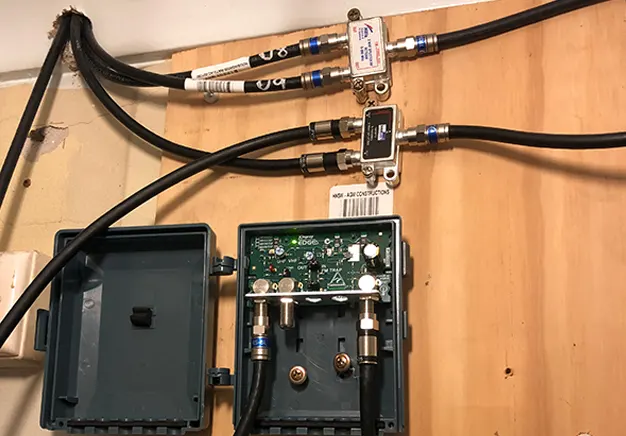
A multi-room setup delivers broadcast signals from a single TV aerial to several televisions. This process involves a single coaxial cable path branching into multiple output lines. Engineers call this signal distribution. A passive splitter works best for two devices in high-signal areas. This metal device features one input port and multiple output ports.
Signal loss occurs whenever a user splits an aerial signal. Each additional TV connection reduces the decibel level of the feed. A distribution amplifier solves signal loss by boosting the incoming data. This powered device compensates for long cable runs and multiple connection points. Aerial distribution ensures every room receives a clear digital picture. Professional installers use shielded coaxial cables to prevent external interference.
Can you connect multiple TVs to One Aerial?
Users can connect multiple televisions to a single aerial using signal distribution tools. This process splits the electrical signal from the antenna into several paths. Each output port sends the broadcast data to a different television. Standard coaxial cables carry these signals across the property.
Splitting a signal reduces the available strength for each connected television. A two-way splitter halves the power of the original feed. Adding four or more TVs causes significant signal degradation and picture breakup. Weak signals result in pixelated images or missing channels. High-quality shielded cables and powered boosters mitigate these signal losses.
How a Single Aerial Feeds Multiple TVs
The broadcast signal flows from the antenna through a primary coaxial cable. This cable connects directly to a signal splitter or a distribution amplifier. The device divides the incoming radio frequency energy into multiple output streams. Each stream travels through dedicated cables to individual television sets.
A passive splitter mechanically shares the raw signal strength among all ports. This division reduces the power level reaching each specific tuner. Distribution amplifiers use mains power to maintain signal integrity during this process. Proper installation requires high-quality connectors to prevent signal leakage or interference. Strong initial signal capture ensures every television receives a stable digital image.
Method to connect Multiple TVs to One Aerial
Multiple hardware options exist to distribute an aerial signal across a home. Users choose a method based on the number of televisions required. A passive splitter offers the simplest solution for two separate connections. This small metal unit requires no external power source to operate. Signal amplifiers provide a powered alternative for larger domestic networks.
Boosters increase signal gain at the start of the cable run. These devices overcome the resistance found in long coaxial cables. Distribution systems manage complex setups involving four or more television points. These units often sit in lofts to centralise the signal cabling. Selecting the correct equipment prevents image pixelation and signal interference. Every method relies on secure F-type or Belling-Lee connectors for stability.
Using a TV Aerial Splitter
A TV aerial splitter is a metal device that divides one signal. It features a single input port and multiple output ports. The splitter sends the aerial feed to two or three televisions simultaneously. This tool works best in areas with high signal strength. Users install splitters directly into the coaxial cable line.
Every output port on a passive splitter suffers from signal loss. A 2-way splitter reduces the signal strength by half. Adding more outputs further weakens the data reaching each television set. This degradation often causes picture freeze or total channel loss. Passive splitters do not require an external power supply to function.
Using a Distribution Amplifier
A distribution amplifier is a powered device that boosts and splits signals. It receives the antenna feed and increases its strength before distribution. The unit sends an equal, amplified signal to every connected television. This hardware requires a mains power connection to function correctly. Installers use these systems for properties with four or more TV points.
Amplifiers prevent the signal degradation typically caused by passive splitters. They are essential in areas with weak broadcast coverage. The device overcomes signal resistance found in extensive coaxial cable runs. This ensures a stable digital picture in every room of the house. A distribution amplifier provides superior performance for complex multi-room setups.
Using a Powered Signal Booster
A powered signal booster is an electronic device that increases the aerial signal gain. Unlike passive splitters, this hardware uses electricity to strengthen the broadcast feed. The booster compensates for low signal levels before the distribution stage. It prevents the digital picture from breaking up across the network. Users install the booster as close to the aerial as possible.
Placing the booster early in the cable run ensures maximum signal integrity. This position allows the device to amplify a clean signal before interference occurs. Powered boosters are essential for properties located in weak signal areas. They provide the necessary power to drive signals through long coaxial cables. This method ensures every television tuner receives a robust and stable data stream.
Loft Distribution Systems
A loft distribution system acts as a central hub for television signals. Installers place a powered amplifier or multiswitch within the attic space. The main aerial cable feeds directly into this central distribution unit. This setup manages the broadcast data for the entire property from one point. Dedicated coaxial cables run from the loft to various rooms.
Centralising the hardware in the loft ensures a clean and professional installation. It removes the need for visible splitters or untidy cables behind televisions. Organised wiring reduces the risk of accidental cable damage or disconnection. This method allows for easy maintenance of the signal network. Structured loft distribution provides the most reliable signal for multi-room viewing.
How to connect multiple TVs step by step
A successful installation requires a logical sequence to maintain signal integrity. Users must prepare all cables and connectors before starting the physical setup. The process involves linking the antenna to a central distribution point. Following these specific steps ensures a stable digital picture for every connected television.
- Connect the main aerial cable to the input port of the splitter. Ensure the connection is tight to prevent signal leakage.
- Run individual coaxial cables from the output ports to each room. Avoid sharp bends in the cabling to maintain signal flow.
- Attach the coaxial cable to the RF input on each television. Use high-quality metal connectors for a secure and reliable fit.
- Power on the distribution amplifier or signal booster if used. Check that the status light indicates the device is active.
- Perform a full channel scan on every connected television set. This step ensures the tuner identifies all available digital broadcasts.
How many TVs can one aerial support?
The number of televisions an antenna supports depends on the local signal strength. High-gain aerials in strong signal areas provide more capacity for distribution. The quality of the equipment used determines the final connection limit. Standard passive splitters effectively support between two and four television sets. Long cable runs increase resistance and reduce the total number of viable connections.
A powered distribution amplifier allows one aerial to feed eight or more televisions. These devices actively maintain the signal voltage across complex domestic networks. Exceeding the capacity of the signal leads to pixelation or total loss of channels. Professional installers measure decibel levels to ensure every port receives adequate power. Correct shielding and high-quality coaxial cables maximise the potential of a single antenna.
Common Problems When Connecting Multiple TVs
Weak signal levels cause immediate issues like pixelation and screen freezing. These problems occur when the digital data stream becomes inconsistent. Each additional television connection increases the risk of total signal failure. A specific television might show a “no signal” message while others function normally. This discrepancy often stems from poor cable quality or faulty splitter ports.
The complexity of the cabling network increases the potential for interference. Loose connectors or damaged shielding let external noise enter the system. Long coaxial cable runs naturally lose power as the signal travels. Adding more televisions drains the available energy from the primary aerial source. Installers must balance signal gain to prevent over-amplification or signal dropouts.
How to Fix Signal Loss in Multi-TV Setups
Replacing a passive splitter with a powered distribution amplifier restores signal strength. This upgrade provides active gain to each output port. Using high-quality double-shielded coaxial cables prevents external electromagnetic interference. These cables protect the broadcast data from mobile phone and Wi-Fi signals. Reducing the total length of cable runs minimises natural signal attenuation. Shorter paths ensure more power reaches the television tuner.
Checking every F-type connector for a tight fit prevents signal leakage. A loose connection introduces noise and degrades the digital image quality. Installers should remove any unnecessary or unused wall sockets from the network. This action concentrates the available aerial power on the active viewing points. Periodic inspections of the rooftop antenna ensure the primary signal source remains optimal. These steps collectively guarantee a stable and clear multi-room television experience.
Best Equipment for Multi-TV Aerial Setup
Selecting professional-grade hardware ensures a reliable digital broadcast throughout the home. High-quality components prevent common issues like signal interference and pixelation by maintaining the integrity of the antenna feed. When planning your installation, it is helpful to source specific TV aerial equipment that is designed to handle the demands of modern digital distribution.
- Aerial Splitter: A compact metal device used to divide a single signal for two or more televisions.
- Distribution Amplifier: A powered unit that actively boosts and splits signals to serve multiple rooms without loss.
- Coaxial Cable: High-quality shielded cables that carry digital data securely from the antenna to each TV.
- F-type Connectors: Screw-on plugs that provide a secure, low-loss mechanical link between cables and devices.
- Belling-Lee Plugs: The standard connectors used to plug the final cable directly into the television tuner.
- Wall Plates: These provide a clean, professional internal finish for cable connections inside individual rooms.
- Signal Booster: An inline device used to increase gain in areas where the initial broadcast coverage is weak.
When to use a professional Installation
A professional tv aerial and satellite installation is often necessary for large properties or complex multi-room setups. While simple two-way splits are manageable for DIY enthusiasts, managing more than four television points requires precise signal balancing. Persistent signal issues, such as intermittent pixelation or missing channels, often indicate a deeper problem with the antenna or cabling. Experts can navigate complex wiring through wall cavities and lofts to ensure a tidy, hidden finish.
Specialised technicians use digital signal meters to perform accurate testing at every wall socket. These tools identify the exact decibel levels and bit error rates, ensuring the signal is neither too weak nor over-amplified. A professional installer has the experience to select the best distribution system for your specific geographic location. They ensure the rooftop hardware is safely mounted and that all outdoor connections are properly weather-sealed. Seeking expert help guarantees a future-proof system that provides a consistent viewing experience in every room.
Frequently Asked Questions
How do I split my TV aerial signal to multiple TVs?
Use a TV aerial splitter or distribution amplifier. Connect the aerial to the device, then run separate coaxial cables from each output to each TV.
How many TVs can one aerial support?
One aerial can typically support 2 to 4 TVs using a splitter with good signal strength. With a distribution amplifier, it can support more TVs because the signal is boosted before being shared. The exact number depends on signal quality, cable length, and installation setup.
Does a splitter reduce TV signal quality?
Yes, a splitter reduces TV signal quality because it divides one signal into multiple outputs. Each TV receives a weaker portion of the original signal.
What is the difference between a splitter and an amplifier?
A splitter divides one aerial signal into multiple outputs, which reduces signal strength for each TV. An amplifier boosts the signal before or during distribution, helping maintain stronger and more stable reception across multiple TVs.
Do I need an amplifier for multiple TVs?
You need an amplifier for multiple TVs if the signal becomes weak after splitting.